Showing posts with label scrapper. Show all posts

Tuesday, November 14, 2017

War Zone

War Zone

I was originally inspired by that highway scene between Optimus Prime and Bonecrusher in the first Michael Bay Transformer movie. Somehow it morphed into this scene between Jazz and Scrapper instead.

The background picture is not mine. It is from a 2014 AFP photo of a car bombing in Beirut. 

I shot Generation Toy J4ZZ and Scraper with some colored gel on my flash in anticipation of matching them to flames. In Photoshop, I used curve, photo filter, and saturation layers to further blend them into the picture. For Scraper, I placed a shadow layer under him and some dust to obscure where his feet "meet" the ground. His eye flare is from a lens flare render. For both figures, their faction symbols are actual stickers, but with inner, outer, and gradient layer styles enabled to provide that shimmering effect. As usual, I covered up obvious screws, filled in gaps in the form, and provided some subtle glow layers.

In the foreground, I blended in some embers from stock photos by placing them in front and behind J4ZZ. They add some more depth to the image.

Direct link - https://drive.google.com/open?id=1F5LK407pVpJ7_NPvvkmsTbnTmsbnkeFP

https://www.facebook.com/lapstransformersphotos/
https://www.instagram.com/laptutran/
https://www.flickr.com/photos/19429167@N02/albums


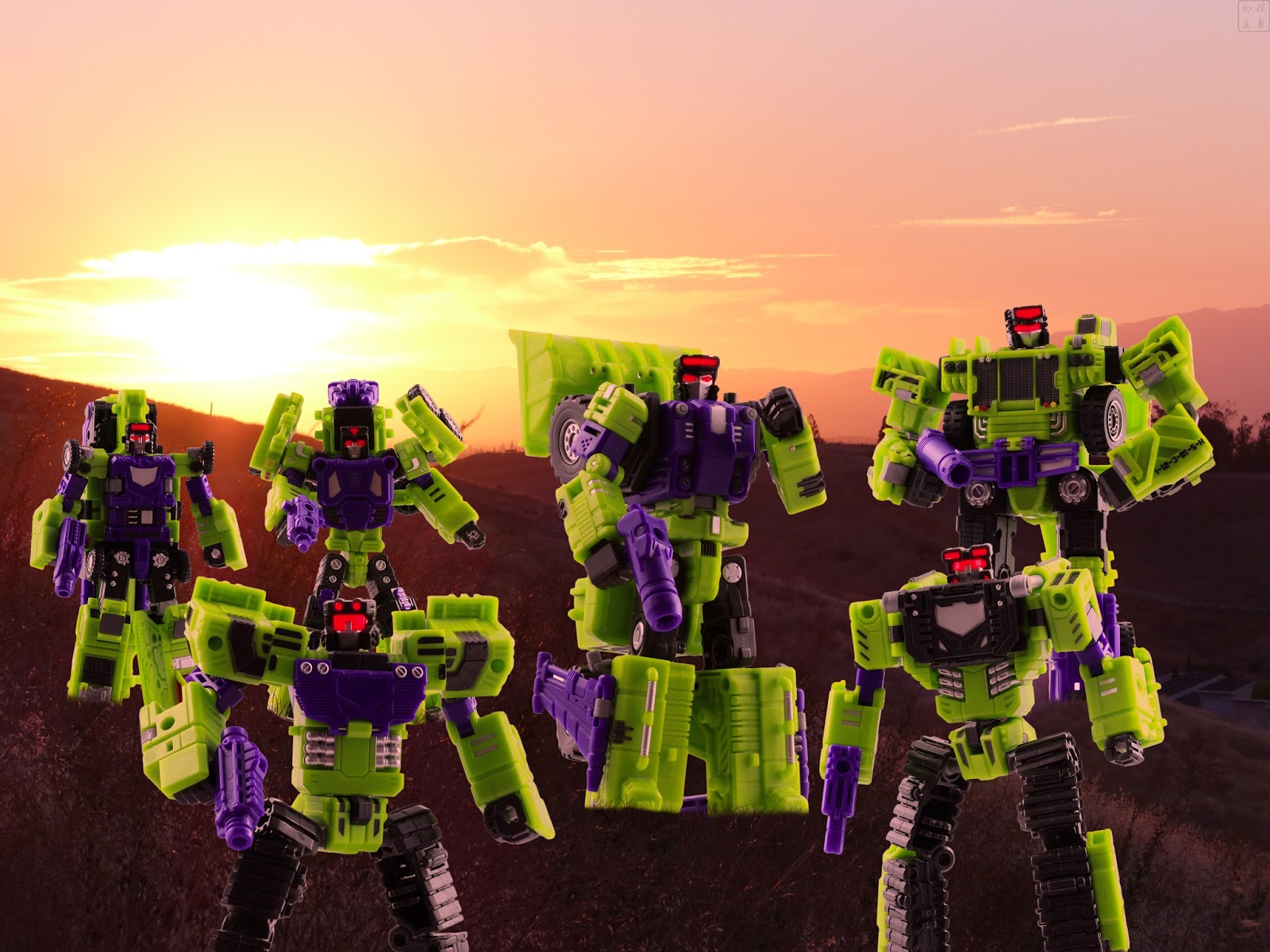
Saturday, September 3, 2016

TFC Toys Constructicons

Before gearing up to look at the Generation Toy and Toyworld Constructicons, I wanted to revisit an oldie but goodie.

The TFC Toys Constructicons are starting to show their age, but they are still a fun set. They were my first exposure to TFC Toys. Some of the figures don't really look like their source material, but I'm not really going to keep them in this mode anyways.

They lack feet and wrist articlation, severly limiting their posability. Some of them are super kibbly. With Mad Blender and Exgraver, it was simply easier to remove their cement mixer and shovel.

I spent a little time trying to blend their feet into the grass. Photoshop has this grass shapped brush that randomly changes property with each click. It seems to have the effect I wanted when applied to the layer mask at each foot. To save time, I cheated with Exgraver and Neckbreaker.

The background is a shot of the evening sunset from Communications Hill. I applied a red photo filter to the figures in an attempt to impart that rusty sunset glow. Being so strongly backlit by a sunset, they really should have been more in silhouette, but that's what Photoshop is for.

Direct link - https://drive.google.com/open?id=0Bwxl1QbH6hwVQkpPZUs1SlJvZXc


Tuesday, January 5, 2016

Astrotrain, transform and get us out of here!

Transportation Captain is standing in for Astrotrain. The back of his train mode doesn’t actually open. I did that in Photoshop by cutting out a small section and rotating it. I didn’t use DX9 Chigurh because of convenience. I already had a side shot of Transportation Captain when I had him in train mode recently. I really didn’t want to transform Toyworld Evila Star again because he has a clear plastic hinge in his backpack that I don’t want to stress.

I couldn’t figure out how to get Rumble to hold Apollyon’s fusion cannon, which is quite a bit larger than Rumble himself. I also tried with Toyworld Hegemon’s fusion cannon, but I couldn’t get him to hold that either. In the end, I just took a separate shot and layered it on Rumble using a layer mask. The final shot is with Hegemon’s fusion cannon.

Apollyon was similarly layered on Soundwave with a layer mask because Soundwave’s arms are not long enough nor strong enough to hold Apollyon in that fashion. It was just a matter of trying different camera angles until I found a shot that I was satisfied with. Unfortunately, Apollyon’s head doesn’t have enough upward articulation to match the source material.

Since Generation Toys has yet to release their version of Scavenger, I used Scraper instead. He, Mixer, and Starscream were simply individual shots that were added to the scene.

The immediate foreground elements include a rock from my garden and stairs from my home. Both had a field blur and an orange overlay applied. The stairs had additional Hue/Saturation layers applied to the left edge to simulate the broken edge.

The stray blaster bolt, because the Autobots seem to have worse aim than Stormtroopers, was created from a deformed Marquee fill-in, with Inner and Outer glow layer styles in effect.

The ground is a shot of the desert ground tile from Toy Stages. I applied a Render Cloud layer to simulate mist and dust. It also helps to keep the figures from looking like they are simply floating over the ground.

The background is a shot of the Mechanical Chain Base panels. I used Layer Masks and colored layers to make it look like sections had been blasted away and scorched. The sky is a shot of some random summer day. The smoke plume was created with my custom smoke brush.

Hi-res image: https://drive.google.com/file/d/0Bwxl1QbH6hwVeEt3cGMtM1ExVGc/view?usp=sharing


https://www.facebook.com/lapstransformersphotos/
https://www.instagram.com/laptutran/
https://www.flickr.com/photos/19429167@N02/albums


Starscream's Triumph

Starscream's Triumph It's my interpretation of the scene where Starscream and Bruticus best Megatron. Zeta Toys Armageddon stood i...